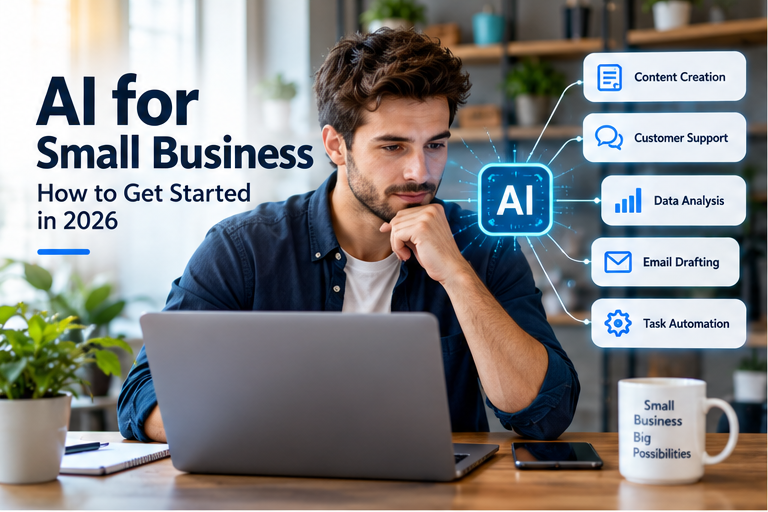
Artificial intelligence is becoming a practical tool for businesses of all sizes. For small companies, however, the biggest opportunity may not be complicated automation or advanced technology. Instead, AI can help with everyday tasks that take valuable time away from owners and employees.
Writing emails, organizing information, creating marketing ideas, summarizing meetings, and researching topics are just a few examples. When used carefully, these tools can support a small team without taking away the human judgment that keeps a business running.
So, how should a small business approach AI in 2026?
The best starting point is simple: identify a real business problem, choose an appropriate tool, test it on a small scale, and measure the results. From there, a company can decide whether expanding its use makes sense.
What Is AI for Small Business?
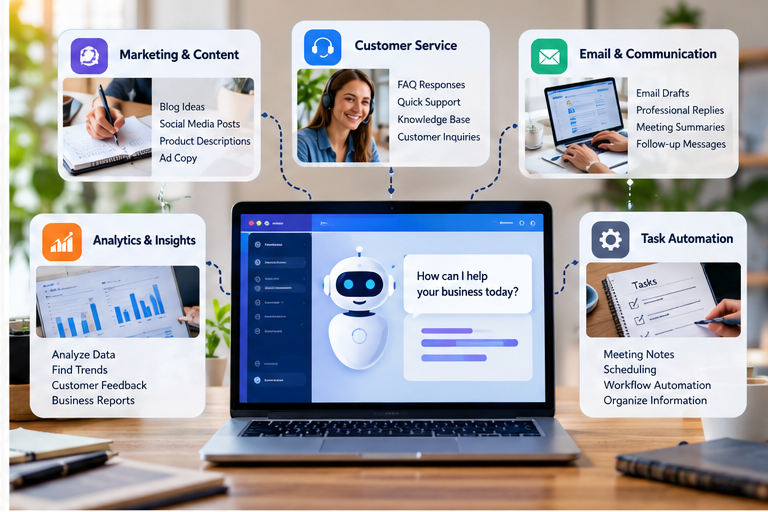
AI for small business refers to using artificial intelligence tools to support routine operations, communication, marketing, research, customer service, and other business activities.
These tools can assist with tasks such as:
- Drafting and editing emails
- Brainstorming marketing ideas
- Creating content outlines
- Summarizing documents
- Organizing information
- Analyzing business data
- Preparing meeting summaries
- Answering common customer questions
- Supporting repetitive administrative work
Importantly, AI does not have to replace employees or business owners. In many situations, it works better as an assistant that helps people complete certain tasks more efficiently.
For example, a business owner might use AI to create a first draft of an email. The owner can then review the message, add important details, and send the final version.
That approach keeps people involved while reducing the amount of time spent on repetitive work.
Why Are Small Businesses Using AI?
Small businesses often operate with limited staff and resources. As a result, repetitive tasks can take up a significant amount of an owner’s working day.
AI can help reduce some of that workload when the technology is applied to the right tasks.
A July 2026 survey from the U.S. Chamber of Commerce Foundation and Ipsos of 750 small-business owners and operators found that businesses using AI commonly described benefits such as greater efficiency, improved work quality, and the ability to take on more ambitious assignments.
However, those results do not mean every business will receive the same benefits. The value of an AI tool depends on the type of work, the quality of the implementation, the information available to the system, and the level of human oversight.
For that reason, small businesses should focus on specific use cases rather than adopting AI simply because it is popular.
7 Practical Ways Small Businesses Can Use AI
1. Create and Improve Marketing Content
Marketing requires a steady supply of ideas, but coming up with those ideas can be difficult when a small team is already busy.
AI can help brainstorm:
- Blog topics
- Social media ideas
- Email subject lines
- Product descriptions
- Advertisement concepts
- Video topics
- Customer survey questions
For instance, a local fitness studio could ask an AI tool to suggest educational topics for a month’s social media calendar. The owner could then select the useful ideas, add real experience from the business, and create the final posts.
In this way, AI supports the creative process without becoming the voice of the entire brand.
Most importantly, published content should still be reviewed for accuracy, originality, tone, and usefulness.
2. Support Customer Service
Customer service teams frequently answer similar questions.
An AI tool can help prepare responses for common topics such as:
- Opening hours
- Shipping information
- Return policies
- Appointment details
- Product features
- Basic service questions
For example, an online retailer could maintain an approved knowledge base containing shipping and return information. An AI system could then help customer service staff find the relevant information and prepare a draft response.
Even so, complicated complaints or sensitive situations should be handled carefully by a person.
Human involvement is especially important when the customer needs an exception, has a serious complaint, or is dealing with an issue that the available information does not clearly answer.
3. Make Email and Communication Easier
Email is another area where small businesses can save time.
Instead of starting every message from a blank page, an owner can provide the main points and use AI to create a first draft. The final message can then be edited to match the company’s tone.
For example, a business owner could provide:
- The customer’s name
- The purpose of the message
- The relevant dates
- The agreed action
- Any important next steps
The resulting draft can provide a useful starting point.
Before sending it, though, the sender should verify names, dates, prices, promises, and other important details.
As a result, AI becomes a writing assistant rather than an automatic communication system.
4. Analyze Business Information
Small businesses often have useful information sitting inside spreadsheets, surveys, reports, and customer feedback.
AI can help organize or summarize that information and identify patterns that deserve further attention.
Consider a restaurant receiving hundreds of customer comments. An AI tool could help group feedback into topics such as service speed, menu choices, food quality, or ordering problems.
Similarly, an online store could analyze customer questions to identify products that generate repeated confusion.
The technology can make the initial analysis easier. Nevertheless, business owners should review important findings before making major decisions.
5. Reduce Administrative Work
Administrative tasks may not directly generate revenue, but they can consume hours every week.
Depending on the software being used, AI can assist with:
- Meeting summaries
- Internal documents
- Task lists
- Scheduling support
- Standard operating procedures
- Report summaries
- Information organization
For example, a small agency could use AI to turn a meeting transcript into a short list of decisions, responsibilities, and deadlines.
Rather than replacing the meeting or the people involved, the tool simply reduces the time required to organize the information afterward.
6. Help With Research and Brainstorming
AI can also be useful during the early stages of research.
A business owner might use it to generate questions, organize ideas, compare possible approaches, or identify areas that require additional research.
For example, someone considering a new service could ask an AI tool to create a list of customer questions that should be answered before launching it.
However, AI-generated information should not automatically be treated as verified fact.
For important topics involving taxes, regulations, contracts, finance, health, or other high-stakes decisions, verify information with authoritative sources or an appropriately qualified professional.
7. Improve Internal Workflows
Another useful application is workflow improvement.
A business might map a process such as:
Customer order → Payment → Fulfillment → Shipping → Follow-up
Once the process is visible, the owner can identify which steps are repetitive and which ones require human judgment.
From there, AI or other software may be able to support selected parts of the workflow.
This approach is often more practical than attempting to automate the entire business at once.
How to Start Using AI in a Small Business
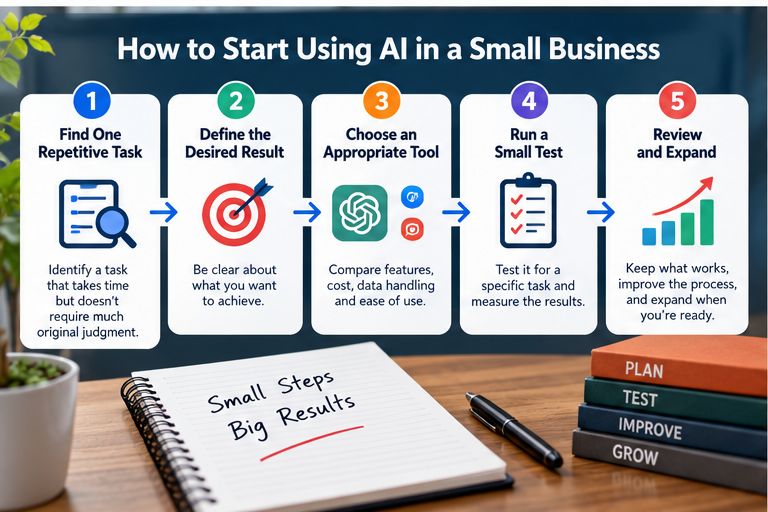
The easiest way to begin is with one clearly defined task.
Step 1: Find One Repetitive Task
Start by looking at the work you or your employees repeat every week.
Ask yourself:
Which task takes a lot of time but requires relatively little original judgment?
Email drafting, meeting summaries, brainstorming, and information organization are common starting points.
Step 2: Define the Desired Result
Once you identify the task, describe the result you want.
For example:
“I want to turn meeting notes into a short list of decisions and action items.”
That goal is much clearer than saying:
“I want to use AI.”
A specific goal also makes it easier to measure whether the technology actually helps.
Step 3: Choose an Appropriate Tool
Different AI tools are designed for different jobs.
Before selecting one, consider:
- Features
- Cost
- Ease of use
- Data handling
- Privacy
- Integration with existing software
- Output quality
- Human review requirements
In addition, avoid choosing a tool simply because it is widely discussed online.
Step 4: Run a Small Test
Next, test the tool with a limited workflow.
Use it for a specific task and compare the results with your current process.
You can measure:
- Time saved
- Quality of the output
- Number of corrections
- Cost
- Employee feedback
For example, if a task previously required one hour and the new process reduces it to 30 minutes without lowering quality, you have useful evidence to consider.
Step 5: Create Human Review Rules
Human review should be part of the process from the beginning.
Some tasks are relatively low risk. Brainstorming ten blog ideas, for instance, does not carry the same consequences as preparing a financial document.
Therefore, create different review levels for different types of work.
A simple internal rule could be:
Low-risk content: Quick human review
Customer-facing information: Detailed accuracy check
Financial, legal, or sensitive information: Appropriate professional or expert review
Step 6: Improve the Workflow
After testing the first process, look at what worked and what did not.
Perhaps AI handles the first 70% of the task effectively while an employee completes the final 30%. That can still represent a useful improvement.
On the other hand, if the tool creates more corrections than it saves, the workflow may need to be changed or abandoned.
The goal is not to force AI into every process. Instead, keep the workflows that produce measurable value.
A Simple Example: A Local Service Business
Imagine a five-person landscaping company.
The owner spends several hours each week answering routine emails, preparing social media ideas, organizing meeting notes, and responding to common customer questions.
Rather than automating everything, the company starts with two tasks: email drafting and meeting summaries.
First, the owner provides basic information for routine customer emails. AI prepares an initial draft, while the owner checks the details before sending it.
Next, the team uses an AI tool to summarize internal meetings into decisions and action items.
After several weeks, the owner compares the new process with the old one.
If the team saves meaningful time without creating additional problems, the company can consider testing another workflow.
This gradual approach limits unnecessary complexity and keeps people in control.
What AI Should Not Replace
AI can support many business activities, but some responsibilities require human judgment.
These may include:
- Building customer relationships
- Making major financial decisions
- Handling serious complaints
- Negotiating important agreements
- Making sensitive hiring decisions
- Reviewing legal obligations
- Protecting confidential information
- Setting company priorities
For these areas, AI can sometimes provide research or drafting assistance. Nevertheless, responsibility should remain with the appropriate people.
The more important the decision, the more carefully the output should be reviewed.
Common AI Mistakes Small Businesses Should Avoid
Using AI Without Checking the Output
AI systems can produce incorrect information.
Therefore, important outputs should be reviewed before they are published, sent to customers, or used for business decisions.
Sharing Sensitive Information
Business owners should understand how an AI service handles information before entering confidential data.
Avoid casually sharing passwords, private customer information, sensitive financial records, or other information that should not be exposed.
Automating Too Much Too Quickly
More automation is not automatically better.
Instead, begin with one workflow that has a clear purpose. Once it works reliably, consider expanding the process.
Treating AI as a Replacement for Expertise
AI can assist with research and routine work, but it does not automatically replace specialized expertise.
For example, a business may use AI to organize questions about taxes or regulations. However, important decisions should still be verified through authoritative sources or qualified professionals.
Publishing Generic AI Content
Another common mistake is producing large amounts of AI-generated content without meaningful editing or original value.
Google’s guidance emphasizes helpful, reliable, people-first content and specifically asks whether content provides original information, substantial value, and a satisfying experience for readers.
Consequently, businesses should use AI as a tool for research, drafting, organization, or brainstorming rather than publishing generic material simply to create more pages.
Is AI Worth Using for a Small Business?

There is no single answer for every company.
Instead, evaluate AI based on a specific business problem.
Ask these questions:
- Does the tool save meaningful time?
- Does it improve the quality of the work?
- Does it reduce repetitive effort?
- Is the cost reasonable?
- Can the business use it safely?
- Can someone review the output?
- Does it make the workflow simpler rather than more complicated?
If the answers are mostly positive, testing the tool may make sense.
However, if an AI system creates more work than it removes, there may be little reason to continue using it.
How to Build a Simple AI Strategy
A practical approach can be summarized in five steps:
- Identify one repetitive task.
- Choose an appropriate tool.
- Test the workflow on a small scale.
- Measure time, quality, cost, and risk.
- Expand only when the process works reliably.
This method gives a small business room to experiment without committing to a complicated technology strategy.
Furthermore, it creates a clear connection between the technology and an actual business need.
Frequently Asked Questions
Q1: What is the best way for a small business to start using AI?
Ans: Start with one repetitive, low-risk task. For example, you could test AI for brainstorming, drafting routine emails, summarizing meetings, or organizing information. Afterward, measure the results before expanding its use.
Q2: Can AI replace employees in a small business?
Ans: AI can automate or assist with certain tasks, but the effect on employees depends on the business, workflow, technology, and level of human involvement. In many situations, businesses can use AI to support employees rather than completely replace them.
Q3: How much does AI cost for a small business?
Ans: Costs vary considerably. Some tools offer free plans, while others use monthly subscriptions or usage-based pricing. Therefore, businesses should compare the expected cost with the time and resources the tool may save.
Q4: Is AI-generated content good for SEO?
Ans: AI assistance does not automatically make content good or bad for SEO. What matters is whether the finished content is useful, accurate, original, and created for people. Google says its systems prioritize helpful and reliable people-first content rather than content created primarily to manipulate search rankings.
Q5: Should a small business verify AI-generated information?
Ans: Yes. AI-generated information can contain errors or incomplete details. Important financial, legal, regulatory, medical, or customer-facing information should be checked against reliable sources before being used.
Q6: Can AI help a small business with marketing?
Ans: Yes. AI can assist with brainstorming, content planning, email ideas, research, and other marketing activities. However, people should review the final material for accuracy, originality, brand voice, and relevance.
Q7: Should a business automate every repetitive task?
Ans: No. Automation should solve a real problem. If a process is inexpensive, simple, or requires significant human judgment, automation may not provide enough value to justify the added complexity.
Final Thoughts
AI does not need to transform an entire company overnight.
For many small businesses, a better approach is to start with one repetitive task, test a suitable tool, and measure the results.
From there, successful workflows can be expanded gradually.
The goal is not to use as much AI as possible. Instead, the objective is to use technology where it genuinely helps people save time, improve work, serve customers, and make better-informed decisions.
As AI tools continue to evolve, small businesses have an opportunity to experiment while keeping human judgment at the center of important decisions.