
A professional website gives a business a central place to explain what it offers, answer customer questions, and provide ways to get in touch.
For many businesses, a website also supports marketing activities such as search engine optimization, content marketing, email campaigns, and social media.
However, building a website is not simply about choosing a design and publishing a few pages. You also need to consider your audience, content, usability, security, and ongoing maintenance.
Google’s current guidance emphasizes helpful, reliable, people-first content and a good overall page experience, including secure pages and content that displays well on mobile devices.
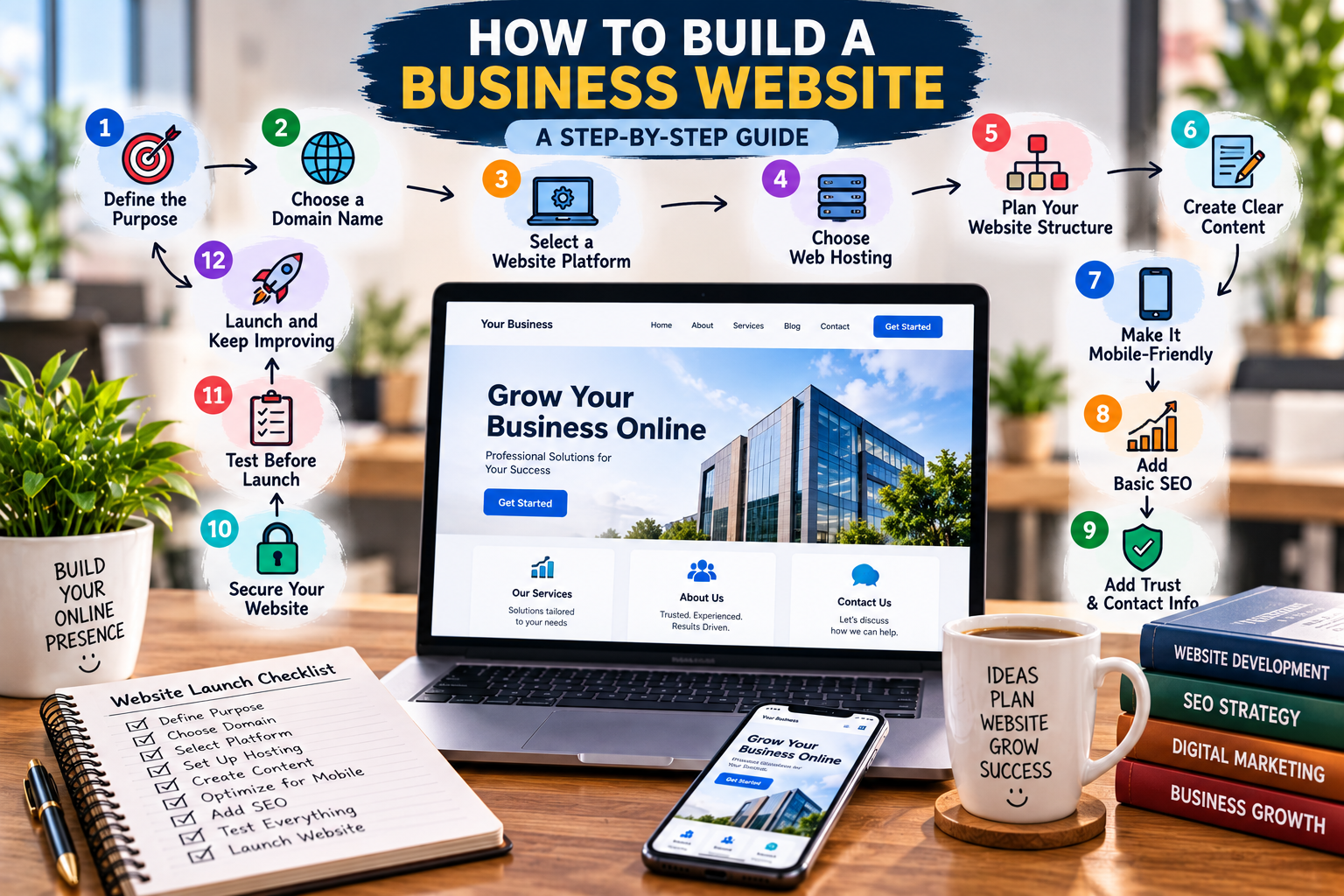
This guide explains how to build a business website step by step.
What Is a Business Website?
A business website is an online presence that provides information about a company, its products, services, or brand.
Depending on the business, a website may be used to:
- Explain products or services
- Generate leads
- Sell products
- Accept bookings
- Publish educational content
- Provide customer support
- Display contact information
- Build brand awareness
Some businesses need only a few informative pages, while others may require e-commerce functionality, customer accounts, booking systems, or other specialized features.
The right setup depends on what you want the website to accomplish.
Why Does Your Business Need a Website?
A website can make it easier for potential customers to learn about your business.
It can also support your broader marketing efforts by giving customers a place to find useful information and take action.
A well-planned website can help you:
- Establish an online presence
- Explain your products or services
- Generate leads
- Provide customer information
- Publish useful content
- Support SEO
- Build credibility
- Give customers an easy way to contact you
Your website should work as part of your overall business plan, rather than operating separately from your broader goals.
1. Define the Purpose of Your Website
Before choosing a platform or design, decide what you want your website to accomplish.
For example, your primary goal might be to:
- Generate leads
- Sell products
- Promote services
- Accept bookings
- Provide information
- Build brand awareness
- Publish educational content
A local service business might want customers to call or submit a contact form.
An online store may focus on product discovery and purchases.
A consulting company may use its website to explain its expertise and generate consultation requests.
Set a Clear Website Goal
Try to describe the primary goal in one sentence.
Example:
“Our website will help small business owners learn about our accounting services and request a consultation.”
A clear goal makes later decisions about design, content, navigation, and calls to action much easier.
2. Choose a Domain Name
Your domain name is the address people use to access your website.
For example:
examplebusiness.com
When choosing a domain, consider the following:
- Keep it simple.
- Make it easy to spell.
- Keep it reasonably short.
- Avoid unnecessary numbers.
- Avoid confusing characters.
- Make it relevant to your brand.
- Choose a domain that can grow with your business.
A memorable domain can make it easier for customers to find your business again.
Before purchasing a domain, check whether the name is available and whether it creates any potential trademark or brand confusion.
3. Choose a Website Platform
Next, decide how you will build and manage your website.
Common options include:
- WordPress
- Website builders
- E-commerce platforms
- Custom development
WordPress can be useful for businesses that want control over their content and website structure. Website builders may be suitable for people who want a simpler setup with less technical management.
E-commerce platforms are designed around online selling, while custom development can be useful when a business needs specialized functionality.
Consider:
- Budget
- Technical skills
- Website complexity
- Required features
- Future growth
- Maintenance requirements
Do not choose a platform simply because it is popular. Choose one that fits your actual requirements.
4. Choose Reliable Web Hosting
Web hosting provides the infrastructure needed to make your website available online.
When evaluating hosting, consider:
- Performance
- Security
- Reliability
- Customer support
- Backup options
- Scalability
- Available resources
A small website may have different hosting requirements from a large online store.
Also consider what happens if your website experiences a technical problem. Reliable backups and accessible support can make recovery easier.
5. Plan Your Website Structure
Before creating pages, plan the structure of your website.
A simple business website may include:
- Home
- About
- Services or Products
- Blog
- Contact
- Privacy Policy
- Terms and Conditions
Create a Simple Website Structure
| Page | Main Purpose |
|---|---|
| Home | Introduce the business |
| About | Explain who you are |
| Services | Show what you offer |
| Blog | Provide useful information |
| Contact | Help customers reach you |
Not every business needs exactly the same pages.
For example, an e-commerce website may need product categories, individual product pages, shopping cart functionality, and checkout pages.
Keep navigation simple so visitors can quickly find important information.
6. Create Clear Website Content
Your website content should answer the questions customers are most likely to have.
Explain:
- What your business does
- Who you help
- What products or services you provide
- Why customers should consider your offer
- How customers can contact you
- What they should do next
Use simple language and avoid filling pages with unnecessary text.
Your homepage should communicate the most important information quickly.
For example:
What we offer:
Professional accounting services for small businesses.
Who we help:
Small business owners and entrepreneurs.
Next step:
Request a consultation.
Useful content can also support search visibility when it genuinely helps your audience. Google recommends creating people-first content that provides substantial value rather than producing pages primarily to attract search traffic.
7. Make Your Website Mobile-Friendly
Many people access websites through smartphones and tablets.
Your website should therefore work properly across different screen sizes.
A mobile-friendly website should provide:
- Readable text
- Easy navigation
- Properly sized buttons
- Images that display correctly
- Forms that work on smaller screens
- Content that does not require excessive horizontal scrolling
Google’s page-experience guidance specifically asks site owners to check whether their content displays well on mobile devices.
Test your website on multiple devices before launch. A page that looks good on a desktop may still have usability problems on a phone.
8. Add Basic SEO
Search engine optimization can help search engines understand your website and help people discover relevant pages.
Basic SEO elements include:
- Descriptive page titles
- Useful meta descriptions
- Relevant headings
- Clear URLs
- Internal links
- Descriptive image alt text
- Helpful original content
Avoid adding keywords unnaturally.
For example, instead of repeatedly writing “best accounting business website,” explain your services naturally and create useful information for your intended audience.
Google’s Search Central documentation provides guidance on search appearance, titles, images, and other SEO-related areas.
9. Add Trust and Contact Information
Visitors should be able to understand who operates the website and how to contact the business.
Depending on your business, include:
- Business name
- Email address
- Phone number
- Business location
- About page
- Service information
- Customer reviews or testimonials
- Privacy information
Only publish testimonials and reviews that are genuine and accurately represented.
Clear contact information also makes it easier for potential customers to take the next step.
10. Secure Your Website
Website security should be considered from the beginning.
One basic requirement is using HTTPS, which helps protect information transferred between a user’s browser and your website.
You should also consider:
- Strong administrator passwords
- Regular software updates
- Reliable backups
- Security monitoring
- Limited administrator access
- Secure hosting
Security is not a one-time task. Website software and plugins may require ongoing updates and maintenance.
Google’s page-experience guidance includes serving pages securely as one of the areas site owners should assess.
11. Test Your Website Before Launch
Do not publish your website without testing it.
Check:
Navigation
Make sure menus and important links work correctly.
Contact Forms
Submit test messages and confirm that they reach the correct email address.
Mobile Display
Check pages on phones and tablets.
Images
Make sure images load correctly and have appropriate alt text.
Spelling
Read important pages carefully for grammar and spelling problems.
Page Speed
Check whether pages load efficiently and identify unnecessary files or large images.
Links
Click internal and external links to make sure they work.
Important Pages
Confirm that your privacy policy, terms, contact page, and other essential pages are accessible.
12. Launch and Continue Improving
Launching your website is only the beginning.
After launch, monitor how visitors use your site and look for opportunities to improve it.
You can:
- Review website traffic
- Monitor search performance
- Update outdated information
- Publish useful content
- Fix broken links
- Improve confusing pages
- Review contact-form submissions
- Check website security
- Improve mobile usability
Google Search Console can help site owners monitor performance in Google Search and check whether Google can index their pages.
A website should evolve as your business and customers change.
Common Business Website Mistakes
Complicated Navigation
Visitors should not need to search through several menus to find basic information.
Slow Pages
Large images, unnecessary scripts, and poorly optimized resources can affect the browsing experience.
Poor Mobile Experience
A website that only looks good on a desktop can create problems for mobile visitors.
Missing Contact Information
Customers should have a clear way to contact your business.
Too Much Text
Long blocks of unnecessary information can make pages difficult to scan.
Weak Calls to Action
Tell visitors what action they can take next, such as contacting you, requesting a quote, or learning about a service.
Ignoring SEO
A website can look professional while still being difficult for search engines and users to understand.
Outdated Content
Old prices, services, contact information, or business details can create confusion.
No Backups
A website problem can become much more serious if you cannot restore your content.
Not Testing Forms
A broken contact form can cause you to miss potential customers without realizing it.
Business Website Launch Checklist
☐ Define website purpose
☐ Choose a domain
☐ Select a platform
☐ Set up hosting
☐ Plan website pages
☐ Create useful content
☐ Optimize for mobile
☐ Apply basic SEO
☐ Add contact information
☐ Secure the website
☐ Test everything
☐ Launch and monitor
FAQs
Q1: How much does it cost to build a business website?
Ans: The cost depends on the platform, hosting, design, functionality, content, and whether you build it yourself or hire professionals. A simple website generally requires fewer resources than a complex e-commerce or custom website.
Q2: What pages should a business website have?
Ans: A basic website may include Home, About, Services or Products, Blog, Contact, Privacy Policy, and Terms and Conditions. The exact structure depends on the business.
Q3: Is WordPress good for a business website?
Ans: WordPress can be a practical option for businesses that want a flexible content management system. The suitability depends on the website’s requirements, available resources, and maintenance needs.
Q4: How long does it take to build a business website?
Ans: The timeline varies. A simple website can be built relatively quickly, while websites with custom design, e-commerce, integrations, or large amounts of content can take considerably longer.
Q5: How do I make my business website appear on Google?
Ans: Create useful content, make your pages accessible to search engines, use descriptive titles and headings, build a clear site structure, and monitor indexing and performance through Google Search Console. Google recommends focusing on helpful, people-first content rather than creating content primarily for search engines.
Final Thoughts
Building a business website starts with a clear purpose.
Choose a suitable platform, create a simple structure, write useful content, make the site mobile-friendly, and apply basic SEO and security practices.
Most importantly, do not treat the launch as the finish line. Review your website regularly, listen to your customers, update your content, and improve areas that create problems.
A useful website should make it easier for people to understand your business and take the next step.
2 thoughts on “Business Website: How to Build One Step by Step”